Google Analytics 4 for SEO: How to Connect GA4 to Your Rank Tracker
Connecting Google Analytics 4 to your SEO platform shows you traffic data alongside keyword rankings. Learn how MorningRank integrates GA4 in minutes.
For most of the past decade, every agency I worked with had the same Monday morning ritual. Open the rank tracker. Open GA4 in another tab. Open Search Console in a third. Try to mentally correlate three datasets that refused to live in the same view. By the time you understood what was happening, the client meeting was already underway.
Connecting Google Analytics 4 directly to your rank tracker collapses that ritual into one screen. The keyword that ranks at position 3 sits next to the 1,800 sessions it drove this month and the 47 conversions those sessions produced. The story writes itself. This is why GA4 integration is now table stakes for any serious SEO platform, and why MorningRank ships it on every plan.
Why GA4 matters specifically for SEO
GA4 replaced Universal Analytics in 2023 and is now the default behavioral analytics layer for almost every site that has not switched to a privacy-first alternative. For SEO specifically, GA4 answers the questions rankings cannot:
- How much traffic is my organic ranking actually driving?
- Are users engaging with the page once they land, or bouncing immediately?
- Which landing pages convert and which do not?
- What share of total revenue is attributable to organic search?
Without GA4 data, an SEO program is a list of rankings. With it, it is a pipeline conversation.
The key GA4 metrics every SEO should monitor
Sessions vs users
Sessions count visits. Users count unique people. A single user who visits three times in a month counts as 1 user and 3 sessions. For SEO, sessions is usually the headline number for traffic growth, but users is the better measure of audience reach. Track both. The ratio (sessions per user) is a useful proxy for how often visitors come back, which is itself an SEO signal Google appears to weigh.
Engagement rate vs bounce rate
GA4 shifted the default metric from bounce rate to engagement rate. An engaged session is one that lasts at least 10 seconds, has a conversion event, or includes 2+ page views. Engagement rate is the percentage of sessions that meet that bar. Bounce rate is now defined as 1 minus engagement rate.
For SEO, engagement rate is the better diagnostic. If a page ranks well but engagement rate is below 40%, the page is wrong for the query. Either the content does not match intent, the page speed is bad, or the layout is fighting the user. Rankings will eventually follow if engagement does not improve.
Top landing pages by organic traffic
The top landing pages report filtered to organic source is the single most useful SEO view in GA4. It shows you, by page, the sessions, users, engagement rate, and conversions driven by organic search. Pair it with rankings data and you know exactly which pages to invest in and which to deprecate.
Conversions from organic
Mark every meaningful action as a GA4 key event: form submissions, demo requests, completed purchases, phone calls (via call tracking integration), and downloads. Then filter the conversions report to organic source. This is the metric your client cares about. Rankings and traffic are leading indicators; conversions are the result.
Why connecting GA4 to your rank tracker is more powerful than using them separately
Looking at rankings and GA4 in separate tabs gives you two flat datasets. Connecting them gives you a relational view that exposes the strategy questions that matter.
A keyword ranking at position 3 driving 2,000 sessions per month and a 6% conversion rate tells a very different story than a keyword at position 3 driving 10 sessions and a 0% conversion rate. The first is a flagship asset. The second is either a low-volume term or a page-intent mismatch. The position number alone does not tell you which. The connected view does.
The other thing it surfaces: pages that rank but do not drive proportional traffic. If your page ranks #2 for a 5,000-volume keyword and only drives 80 sessions, the title and meta description are failing. Fix those and you can double traffic without moving the ranking.
Connecting GA4 to MorningRank in five minutes
The integration runs on Google's OAuth flow, so there are no API keys to copy and no service accounts to provision. The full setup:
- Open the project in MorningRank, go to Settings, then Integrations.
- Click Connect Google Analytics 4. The Google consent screen opens in a new tab.
- Sign in with the Google account that has access to the GA4 property and approve read-only access.
- Choose the GA4 property and the data stream that maps to the project's domain.
- Click Save. The dashboard begins backfilling 16 months of historical data immediately.
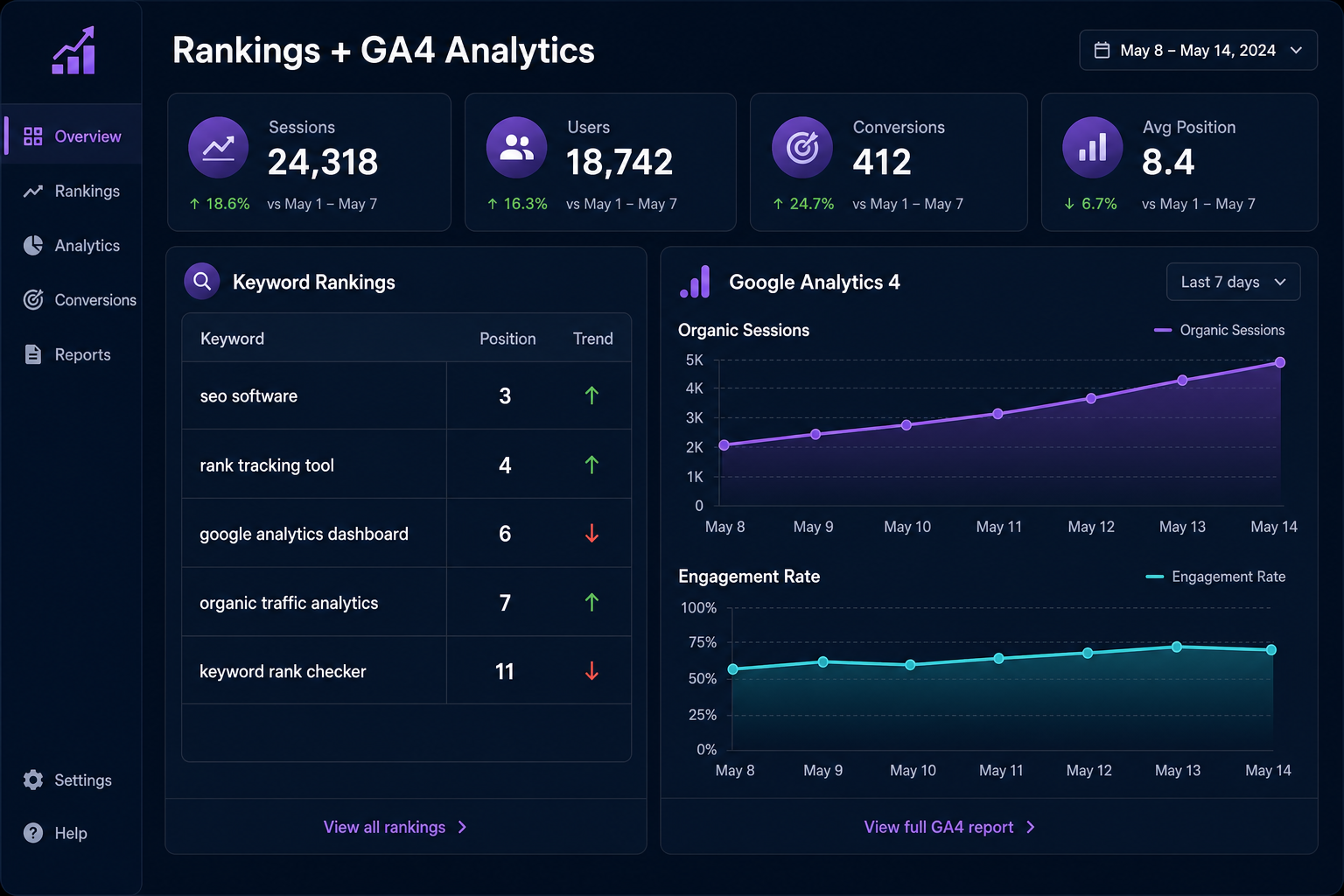
From that point forward, the dashboard shows sessions, users, engagement rate, top organic landing pages, and conversion metrics next to your keyword rankings. The data refreshes daily. Reconnecting takes one click if you ever rotate Google accounts. Plan limits and integration scope are listed on the pricing page.
Reading the combined view
Once GA4 is connected, MorningRank's dashboard merges the two datasets in three views you will use constantly.
The keyword-to-page-to-traffic view
For every tracked keyword, see the ranking position, the landing page Google sends most clicks to, and the GA4 sessions and conversions that landing page drove this period. This is the view that answers "is this keyword actually driving business?" in two seconds.
The trend view
Plot rankings and organic sessions on a shared time axis. When rankings improve and sessions follow, the strategy is working. When rankings improve and sessions stay flat, you have a SERP feature problem (something above the organic result is intercepting the click) or a CTR problem on the title. When sessions drop without ranking changes, you have a SERP feature change to investigate.
The landing page health view
Sort top organic landing pages by engagement rate. The pages at the bottom are either intent-mismatched or technically broken. The pages at the top are the ones to study and clone the patterns from.

How agencies use GA4 plus rankings to prove ROI
Clients do not pay for rankings. They pay for revenue. The fastest way to defend an SEO retainer is to translate rankings into the language of the CFO. The chain that works:
- Rankings improved on N target keywords.
- Those keywords drive M organic sessions per month (from GA4).
- Sessions converted at K% to leads (from GA4 conversions).
- Leads convert at the client's known sales rate to customers.
- Customers are worth the client's known average lifetime value.
- Therefore the SEO program is generating an estimated $X in incremental pipeline this month.
That sentence, written in plain English at the top of the monthly report, is the difference between an agency that retains clients past year two and one that does not. It is also impossible to construct without GA4 connected to your rank tracker. The full reporting structure is in our white label reporting guide.
Data-driven SEO beats gut-feel SEO
The best SEO instincts in the industry came from people who spent years watching rankings move and traffic respond. The reason their instincts were good is they had the feedback loop. If you do not connect rankings to traffic to conversions, you are operating on opinion. If you do, every decision compounds because you can see what is working and what is not.
Connecting GA4 to your rank tracker is the cheapest, fastest, highest-leverage upgrade most SEO programs can make. It takes five minutes. It rewires the entire reporting and decision-making layer. And it does not cost extra on any plan inside MorningRank.
If you have not connected GA4 yet, do it today. The first dashboard view will tell you something about your client's program you did not know last week.
"Connect rankings with traffic and conversions to show how search visibility contributes to business outcomes."
About the author
Tyler Morgan
Head of SEO, Morning Rank
Tyler writes about agency SEO strategy, rankings, AI search, and competitor research at Morning Rank.
Want this kind of insight every week?
MorningRank delivers daily keyword rank tracking, AI SEO recommendations, GA4 integration, and white label client reporting.