How to Track Local SEO Rankings for Multiple Locations
Learn how to track keyword rankings by city, county, and state for local businesses and agency clients using MorningRank's local visibility module.

Every agency I have worked with that scales past 10 multi-location clients hits the same wall. The dentist with 14 offices wants to know how each office ranks in its own city. The HVAC franchise with 38 locations wants county-level data. The regional law firm wants to compare every market head to head. National rank tracking does not answer any of these questions, and stitching together exports from three different tools every month is how agencies burn out their account managers.
This playbook covers why national rankings can mislead local businesses, how location-based tracking works, how to set it up in MorningRank, and how to report it clearly.
Why national rankings are not enough for local businesses
When you run a national rank check for a query like "emergency plumber", Google returns a result based on your tracker's IP, default geography, and personalization signals. That single number tells you almost nothing about what a real customer in Tampa or Spokane sees when they search the same phrase from their phone.
Local SERPs are personalized at the zip code level. BrightLocal's 2025 Local Search Ranking Factors study found that proximity, prominence, and relevance shift result order across distances as small as half a mile. A client can rank #1 from their office address and rank #14 three blocks away. If your reporting only captures the office address result, you are flattering the data and missing the actual problem.
For multi-location brands, the gap is even wider. Each location has its own Google Business Profile, its own review velocity, its own citation footprint, and its own competitive set. Treating them as one entity in reporting hides which markets are healthy and which are leaking traffic to a competitor.
How location-based rank tracking actually works
Modern local rank trackers do not query Google once. They query Google many times, from many simulated locations, and then map the results back to the geography you care about.
City, county, and state level tracking
- City level: the tracker sends a query with a coordinate set tied to a specific city centroid. Useful for a brand with one location per metro.
- County level: the tracker samples a grid of coordinates across the county and aggregates the result. Useful for service-area businesses that operate beyond a single city.
- State level: the tracker samples one coordinate per major metro in the state and produces a state-wide visibility score. Useful for franchises and regional retailers comparing market share.
- Grid tracking: the tracker fires queries on a 7x7 or 9x9 grid centered on the client's location. This is the format that exposes proximity decay and is the only way to see where you actually win versus lose at the block level.
The technical detail that matters: the queries are sent with a real coordinate, a real device profile (mobile vs desktop), and a real language and country code. Anything less and you are tracking a fiction.
The local pack is its own ranking layer
The local pack (sometimes called the map pack or 3-pack) is the boxed set of three business listings with a map, usually anchored above the organic results. It runs on a different algorithm than the 10 blue links and is dominated by Google Business Profile signals: proximity, primary category, review count and recency, photos, and posts.
A client can be invisible in the local pack while ranking #2 organically, or vice versa. Tracking them as one number is the most common reporting mistake I see when auditing agencies. MorningRank tracks the local pack position separately from organic position for every keyword you mark as local intent. That separation is what lets you diagnose which ranking layer is failing.
If you want a deeper breakdown of how the pack is built and how it interacts with AI Overviews, our complete local SEO guide for 2026 walks through the entity layer in detail.
Setting up location-based tracking in MorningRank
Here is the exact flow we walk every new agency through during onboarding. The whole setup takes about 15 minutes per location once you have your keyword list.
Step by step
- Create the project at the brand level, then add each physical location as a tracked location with its full address. MorningRank geocodes the address and stores the coordinates.
- For each location, add the local pack keywords (queries where the local pack triggers) and mark them as local intent. The platform will track local pack position and organic position separately.
- Choose the tracking radius per location. For a single-storefront business in a dense metro, a 7x7 grid at 1-mile spacing is the right default. For a service-area business covering a county, expand to a 9x9 grid at 3-mile spacing.
- Set the device profile to mobile for any local-intent keyword. More than 60% of local searches happen on mobile, and the SERP differs from desktop in subtle but important ways.
- Schedule daily scans during business hours in the client's time zone. SERPs shift across the day for some queries; locking in a consistent scan window keeps the data comparable week over week.
Once the project is running, the platform builds a daily heatmap per location. You can pull it into a client report with one click, or send the live link to the client. The full setup and what gets included on each plan is on the features page and pricing page.
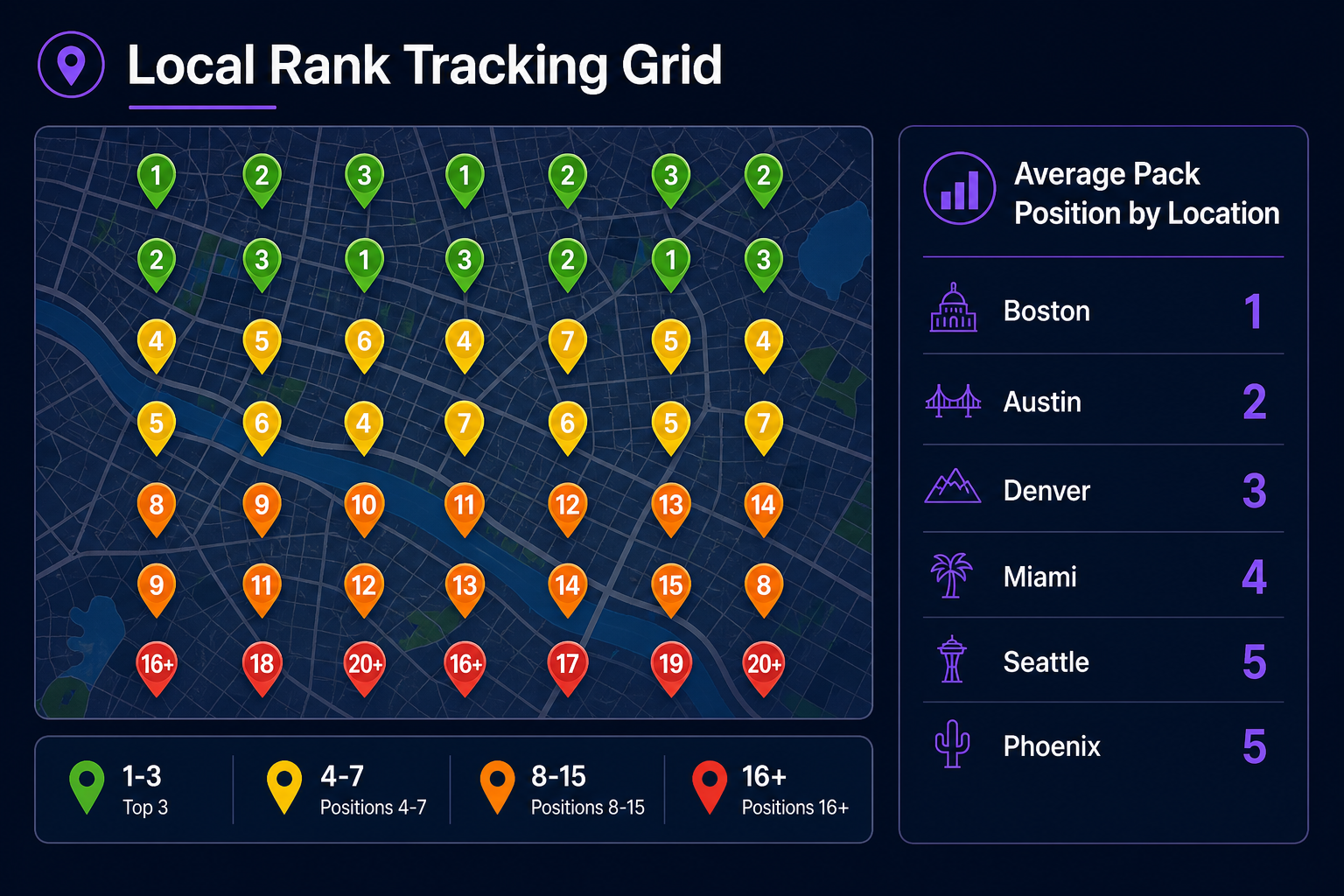
Reading the local visibility comparison table
The comparison table inside MorningRank's local visibility module is where the strategy work happens. Each row is a location. Each column is a metric: average local pack position, share of local 3-pack, organic average position, AI Overview citation rate, and 30-day delta.
What I look for first: locations where average local pack position is worse than 4. Anything beyond position 3 means you are below the fold of the pack and getting almost no clicks. Then I sort by 30-day delta and flag any location that lost more than 1.5 positions of average. That is the early warning that something changed (a competitor added a location, a review burst, a category change) and the location needs investigation.
The table also surfaces the inverse: locations punching above their weight. Those are the playbooks you want to clone across the rest of the portfolio.
How to report local rankings to clients
Stop sending clients a 40-row keyword spreadsheet. They do not read it. Replace it with a one-page summary per location plus a link to the live dashboard.
The format that works:
- Headline: "Average local pack position improved from 4.2 to 2.8 across 14 locations this quarter."
- Best market and worst market called out by name, with one sentence on why each.
- Three actions taken this month tied directly to the locations that improved.
- Three planned actions for next month tied to the worst-performing locations.
- A link to the live MorningRank dashboard so they can drill in if they want to.
This format compresses what used to be a 20-page deck into a one-screen executive summary. Clients open it on their phone, understand what is happening, and respond. That is the bar.
Pulling it together
Multi-location SEO is not harder than single-location SEO; it is just unforgiving of bad reporting. If you cannot show a client which of their locations is winning, which is losing, and what you are doing about each, you will lose the account inside 12 months.
Track each location independently. Track the local pack and organic separately. Use grid scans to expose proximity decay. Report by location with one paragraph per market and a live link for the curious. That is the whole system. The platform layer just makes it run on autopilot.
"Treat every location as its own SEO program and report it separately. Portfolio averages can hide local problems."
About the author
Samantha Reyes
Local SEO Lead, Morning Rank
Samantha writes about local search strategy, multi-location SEO, and practical agency workflows at Morning Rank.
Want this kind of insight every week?
MorningRank delivers daily keyword rank tracking, AI SEO recommendations, GA4 integration, and white label client reporting.