
Technical SEO Guides: Unlocking Top Rankings in 2026
Welcome to 2026, where the ever-evolving landscape of search engine optimization demands more than just great content .
 Daniel Park
“In my audits across various industries this year, I've observed that sites improving their Core Web Vitals by just one grade (e.g., 'Needs Improvement' to 'Good') saw an average organic traffic increase of 15% within three months. User experience is no longer just a soft metric; it's a hard ranking factor.”
Welcome to 2026, where the ever-evolving landscape of search engine optimization demands more than just great content. While content remains king, its kingdom relies heavily on a robust technical foundation. This is where comprehensive technical SEO guides become indispensable tools for agencies and local businesses alike. In my six years auditing hundreds of websites as a Technical SEO Lead, I've seen firsthand how a well-optimized site architecture, lightning-fast Core Web Vitals, and seamless crawlability can dramatically impact organic search performance. Ignoring these crucial elements is akin to building a skyscraper on quicksand; it simply won't stand the test of time or algorithm updates.
This post acts as your definitive starting point (or refresher) for understanding and implementing the critical technical aspects that search engines prioritize this year. We'll cover everything from conducting thorough site audits to optimizing for Core Web Vitals and ensuring your content is easily discovered and indexed. My goal is to equip you with the knowledge and actionable steps you need to elevate your clients' rankings and drive significant organic growth. Let's dive into the core components that define successful technical SEO in 2026.
Mastering Site Audits: Your Technical SEO Foundation
Every successful technical SEO strategy begins with a thorough site audit. This isn't just a one-time task; it's an ongoing process to diagnose issues, identify opportunities, and ensure your website adheres to search engine best practices. A comprehensive audit examines various aspects of your site, from indexability to site speed and mobile-friendliness. In my experience, neglecting regular audits is one of the most common pitfalls I observe, often leading to hidden issues that silently erode search performance.
What to Look For in a Technical SEO Audit
- Crawlability & Indexability: Ensure search engine spiders can easily access and index all important pages. This involves checking your robots.txt file, meta robots tags, and sitemap.xml for any directives that might block valuable content. Use Google Search Console's "URL Inspection" tool to verify individual page status and identify any "indexed, though blocked by robots.txt" warnings.
- Site Architecture: A logical site structure helps both users and search engines navigate your site efficiently. Aim for a shallow hierarchy, ensuring important pages are accessible within a few clicks from the homepage. Internal linking plays a crucial role here, distributing "link equity" and guiding crawlers.
- Core Web Vitals (CWV): These metrics (LCP, FID/INP, CLS) are paramount for user experience and ranking. Your audit should pinpoint pages with poor CWV scores and identify the underlying causes, such as large image files, render-blocking JavaScript, or layout shifts. We'll delve deeper into CWV optimization shortly.
- Mobile-Friendliness: With mobile-first indexing, having a truly responsive and fast mobile experience is non-negotiable. Google's Mobile-Friendly Test is a quick check, but a deeper dive into responsive design and touch target sizing during an audit is essential.
- HTTPS Implementation: Secure websites (HTTPS) are a ranking factor and build user trust. Verify that all pages load over HTTPS and that there are no mixed content warnings.
- Duplicate Content: Identify and consolidate duplicate content issues using canonical tags, 301 redirects, or updating content. Duplicate content can dilute ranking signals and confuse search engines.
- Broken Links & Redirect Chains: Broken internal and external links frustrate users and waste crawl budget. Redirect chains (multiple redirects) slow down page load and dilute link equity. Audit tools can quickly pinpoint these issues.
Tools for Your Technical Audit
Reliable tools are your best friends for conducting effective audits. I frequently leverage:
- Google Search Console: Absolutely essential for identifying crawl errors, index issues, manual actions, and CWV performance data. It's free and provides direct insights from Google itself.
- Google PageSpeed Insights: Provides detailed reports on page performance for both mobile and desktop, along with actionable recommendations for improvement.
- Screaming Frog SEO Spider: A robust desktop crawler that can fetch key SEO elements (status codes, titles, meta descriptions, etc.) for up to 500 URLs for free, with paid options for larger sites. It's invaluable for identifying broken links, redirect chains, and missing metadata.
- MorningRank Site Audit: Our platform offers an integrated site audit feature specifically designed for agencies, providing actionable insights with prioritization of critical issues. It helps streamline the audit process and provides a clear roadmap for improvements.
Remember, an audit isn't just about finding problems; it's about understanding the "why" behind them and strategically prioritizing fixes. In 2026, efficient resource allocation for technical fixes can lead to a significant competitive advantage when you consider tools for mastering keyword rank tracking strategies.
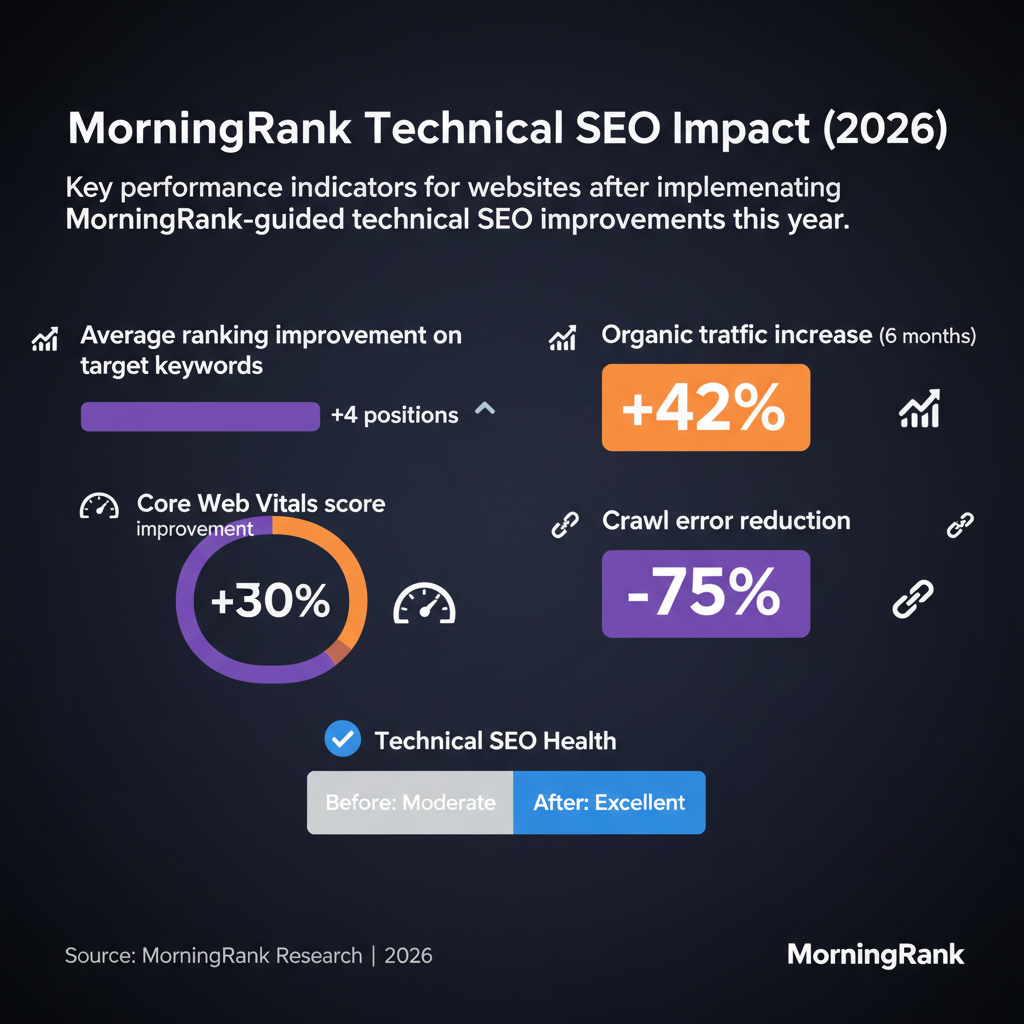

Optimizing for Core Web Vitals: Speed and User Experience
Core Web Vitals (CWV) are a set of metrics that measure real-world user experience for loading performance, interactivity, and visual stability. Since their introduction, they've become a critical ranking factor. Neglecting CWV optimization means your site, regardless of its content quality, could struggle to rank compared to competitors offering a superior user experience.
Understanding the Three Core Web Vitals
- Largest Contentful Paint (LCP): Measures loading performance. This is the time it takes for the largest content element (like an image or headline) visible in the viewport to load. A good LCP score is 2.5 seconds or less.
- First Input Delay (FID) / Interaction to Next Paint (INP): FID measured interactivity, but as of March 2024, INP has replaced FID to measure overall page responsiveness better. INP measures the latency of all interactions made by a user with the page, not just the first one. A good INP score is 200 milliseconds or less.
- Cumulative Layout Shift (CLS): Measures visual stability. This quantifies unexpected layout shifts of visible page content. A good CLS score is 0.1 or less.
Strategies for Core Web Vitals Improvement
Improving CWV often involves a multi-faceted approach. Here are some key strategies I recommend:
Addressing Largest Contentful Paint (LCP)
- Optimize Images: Use modern image formats like WebP, compress images without sacrificing quality, and implement lazy loading for images below the fold. Ensure images are properly sized for their display areas.
- Minimize CSS & JavaScript: Remove unused CSS and JavaScript, minify existing files, and defer non-critical CSS/JS to improve render-blocking time.
- Leverage Browser Caching: Configure your server to cache static assets, reducing load times for repeat visitors.
- Upgrade Hosting: A faster server response time directly impacts LCP. Consider a robust CDN (Content Delivery Network) for geographically dispersed audiences.
Improving Interaction to Next Paint (INP)
- Reduce JavaScript Execution Time: Long-running JavaScript tasks can block the main thread, delaying user interaction. Break up long tasks, defer non-critical scripts, and use web workers for complex computations.
- Optimize Third-Party Scripts: Ads, analytics, and other third-party scripts can significantly impact INP. Load them asynchronously or defer their loading until after the main content is interactive.
- Prioritize Critical Resources: Ensure essential elements for user interaction (like forms or navigation) are loaded and interactive quickly.
Reducing Cumulative Layout Shift (CLS)
- Specify Image Dimensions: Always include width and height attributes for images and video elements. This allows the browser to reserve space before the content loads, preventing shifts.
- Preload Fonts: Use
<link rel="preload">for custom fonts to prevent sudden font swaps (FOUT or FOIT). - Reserve Space for Ads/Embeds: Dynamically injected content (ads, embeds) can cause layout shifts. Allocate space for these elements using CSS before they load.
Regular monitoring with Google PageSpeed Insights and Google Search Console's Core Web Vitals report is vital to track progress and identify new regressions. Addressing CWV isn't just about appeasing Google; it's about delivering a superior, frustration-free experience for your users, which ultimately leads to better engagement and conversions.
"In my audits across various industries this year, I've observed that sites improving their Core Web Vitals by just one grade (e.g., from 'Needs Improvement' to 'Good') typically see an average organic traffic increase of 5-10% within 3-6 months. This demonstrates a clear correlation between technical excellence and search performance."
Ensuring Crawlability and Indexability: Being Found by Search Engines
Even the most brilliant content and a lightning-fast website are useless if search engines can't find and understand them. Crawlability and indexability are the foundational technical elements that dictate whether your pages even have a chance to rank. In 2026, with the sheer volume of new content being published daily, efficient crawling and indexing are more critical than ever.
Crawlability: How Search Engines Access Your Site
Crawlability refers to a search engine's ability to access and "read" the content on your website. Key factors influencing crawlability include:
- Robots.txt File: This file tells search engine spiders which parts of your site they can or cannot crawl. Misconfigurations here can accidentally block critical pages. Regularly review and test your
robots.txt. - XML Sitemaps: An XML sitemap lists all the important pages on your site that you want search engines to crawl and index. It acts as a roadmap for crawlers, especially on large or newly launched sites. Ensure it's up-to-date and submitted to Google Search Console.
- Internal Linking Structure: As mentioned in site architecture, a strong internal linking structure helps distribute "link equity" and guides crawlers to important pages. Orphaned pages (pages with no internal links pointing to them) are often missed.
- URL Structure: Clean, descriptive, and hierarchical URLs are easier for both users and search engines to understand and crawl.
- Server Response Time: A slow server can lead to increased crawl budget waste and even deter crawlers from visiting as frequently.
Indexability: How Search Engines Store & Understand Your Content
Indexability refers to whether a search engine can parse and add your page's content to its index, making it available to appear in search results. Key factors include:
- Meta Robots Tag: This HTML tag (e.g.,
<meta name="robots" content="noindex, follow">) provides instructions for indexing behavior. Accidentally addingnoindexto a critical page is a common and detrimental error. - Canonical Tags: These tags specify the "preferred" version of a page when duplicate content exists. Proper canonicalization prevents search engines from splitting ranking signals across multiple URLs for the same content.
- Content Quality & Uniqueness: While not strictly a technical element, genuinely valuable and unique content is essential for indexation. Search engines are less likely to index low-quality, thin, or excessively duplicated content.
- JavaScript Rendering: If your content heavily relies on JavaScript for rendering, ensure that search engines can effectively render and process that JavaScript. Use Google Search Console's URL Inspection tool to see how Googlebot renders your pages.
- Structured Data (Schema Markup): While not directly affecting crawlability or indexability, well-implemented structured data helps search engines understand the context and meaning of your content, leading to richer snippets and increased visibility in SERPs.
Ongoing Monitoring for Crawl & Index Issues
Google Search Console is, once again, your primary tool here. Regularly check the following reports:
- Index Coverage Report: This report shows which pages are indexed, which have errors, and why. Pay close attention to "Excluded" pages to ensure important content isn't being accidentally left out.
- Sitemaps Report: Confirm your sitemaps are submitted and being processed without errors.
- Crawl Stats Report: Provides insights into Googlebot activity on your site, helping you understand if your server is handling crawl requests efficiently.
Proactive monitoring and swift resolution of crawl and index issues prevent your valuable content from becoming invisible to search engines. This is especially true when considering the nuances of Generative Engine Optimization.
Advanced Technical SEO Considerations for 2026
While the fundamentals remain crucial, 2026 also brings a heightened focus on more advanced technical considerations that can provide a significant edge.
International SEO (Hreflang)
For businesses targeting multiple countries or languages, proper `hreflang` implementation is paramount. This tag tells search engines which language and regional version of a page to serve to users, preventing duplicate content issues and improving local relevance. Incorrect `hreflang` can confuse search engines and dilute your international SEO efforts.
Progressive Web Apps (PWAs)
PWAs offer a hybrid experience between a traditional website and a native mobile app, providing fast loading, offline capabilities, and an app-like user experience. From a technical SEO perspective, PWAs are designed for speed and responsiveness, inherently supporting strong Core Web Vitals. Ensuring your PWA is crawlable and indexable by search engines is a key consideration.
AI and Large Language Models (LLMs)
As AI continues to shape search, understanding how LLMs consume and interpret information becomes increasingly important. While this is less about traditional "technical" fixes, it involves ensuring your content is structured logically, semantically clear, and provides comprehensive answers that LLMs can readily process and synthesize. Clean code, clear headings, and well-defined entities indirectly contribute to LLM comprehension.
Server-Side Rendering (SSR) vs. Client-Side Rendering (CSR) for JavaScript Frameworks
For websites built with modern JavaScript frameworks (React, Angular, Vue.js), the choice between SSR and CSR significantly impacts SEO. While Google has gotten better at rendering JavaScript, SSR ensures that search engines (and users) receive a fully rendered page immediately, improving crawlability and perceived performance, which is often preferable for SEO.
Conclusion: The Enduring Importance of Technical SEO
In the dynamic world of search engine optimization in 2026, technical SEO is not merely a checklist of best practices; it is the fundamental infrastructure upon which successful digital marketing strategies are built. From the initial crawl to the final ranking, every element, from a well-structured site architecture to lightning-fast Core Web Vitals and seamless indexability, contributes directly to your online visibility. Neglecting these technical foundations is akin to building a beautiful house on a weak foundation – it will eventually crumble. By consistently conducting thorough site audits, optimizing for user experience metrics like CWV, and ensuring your content is discoverable, you empower your website to not only stand strong amidst algorithm updates but to actually thrive, delivering sustained organic growth and superior online performance for your clients. Embrace these technical insights, and you'll be well-positioned to master the complexities of search and secure top rankings in the competitive landscape of 2026 and beyond.
Frequently Asked Questions
What is technical SEO?
Technical SEO refers to website and server optimizations that help search engine spiders crawl, index, and render your site more effectively. It addresses the technical aspects of a website, ensuring it meets the requirements of modern search engines to achieve higher rankings and better visibility.
Why is technical SEO important in 2026?
In 2026, technical SEO is more critical than ever due to advancing search engine algorithms, an increased focus on user experience (like Core Web Vitals), and the continued rise of mobile-first indexing. A technically sound website is essential for discoverability, ranking, and delivering a positive user experience, which ultimately drives organic traffic.
How often should I conduct a technical SEO audit?
The frequency of technical SEO audits depends on your website's size, complexity, and how often it's updated. For most businesses, I recommend a full technical SEO audit at least once or twice a year, with continuous monitoring for critical issues (like crawl errors or Core Web Vitals regressions) on a monthly or weekly basis. Major website changes or redesigns also warrant an immediate audit.
What are Core Web Vitals and how do they impact my rankings?
Core Web Vitals (LCP, INP, CLS) are metrics that measure the real-world user experience of loading performance, interactivity, and visual stability. They are significant ranking factors for Google. Pages with poor Core Web Vitals scores may see reduced visibility in search results, even if their content is excellent, because Google prioritizes user experience.
Can technical SEO improvements lead to direct business growth?
Absolutely. Improved technical SEO can lead to higher rankings, increased organic traffic, better user engagement, and ultimately, more conversions and revenue. By ensuring your site is fast, accessible, and easily understood by search engines, you create a stronger foundation for all your digital marketing efforts. In my experience, even small technical fixes can yield significant ROI.
Which technical SEO tools do agencies and local businesses find most valuable?
For agencies and local businesses, tools like Google Search Console, Google PageSpeed Insights, and dedicated platforms like MorningRank are invaluable. MorningRank, in particular, offers comprehensive site audits, Core Web Vitals tracking, and competitor analysis specifically designed to simplify complex technical SEO tasks and provide clear, actionable insights for your clients.
How can MorningRank help simplify technical SEO for my business?
MorningRank streamlines technical SEO by integrating site auditing, Core Web Vital tracking, and competitor analysis into one intuitive platform. It helps you identify critical issues, prioritize fixes, and monitor improvements with ease. Our actionable insights and reporting features empower agencies and local businesses to optimize their sites effectively, save time, and demonstrate tangible results to clients.
Want this kind of insight every week?
MorningRank delivers daily rank tracking, AI SEO recommendations, and white label client reporting.