
Mastering Core Web Vitals in 2026: An In-Depth Technical SEO Guide
Core Web Vitals are a set of specific factors that Google considers important for overall user experience on a webpage, directly impacting search rankings.
 Daniel Park
“In my experience, even minor improvements in Core Web Vitals can lead to significant gains in organic visibility and user satisfaction, directly impacting client success rates.”
Core Web Vitals are a set of specific factors that Google considers important for overall user experience on a webpage, directly impacting search rankings. Optimizing these metrics (Largest Contentful Paint, Interaction to Next Paint, and Cumulative Layout Shift) through technical SEO is essential for achieving higher visibility and providing a superior user experience in 2026.
Key Takeaways
- Core Web Vitals are critical ranking factors that assess page experience.
- Optimizing Largest Contentful Paint (LCP) involves improving server response times and image loading.
- Improving Interaction to Next Paint (INP) requires minimizing JavaScript execution and optimizing input delays.
- Reducing Cumulative Layout Shift (CLS) focuses on proper image dimensions, ad placements, and dynamic content handling.
- Regular auditing with tools like MorningRank's SEO audit feature is essential for sustained Core Web Vitals performance.
As the digital landscape evolves in 2026, the emphasis on user experience has intensified. Google's Core Web Vitals remain a cornerstone of its page experience signals, directly influencing how websites rank in search results. For agencies and local businesses, understanding and optimizing these vitals is not just about meeting a technical requirement, it is about delivering a fast, stable, and engaging experience to potential customers. In my experience, even minor improvements in these areas can lead to significant gains in organic visibility and user satisfaction. This comprehensive technical SEO guide will walk you through each Core Web Vital, offering actionable strategies to ensure your site is not only crawlable but also provides an exceptional user experience.
What are Core Web Vitals and Why Are They Crucial for SEO in 2026?
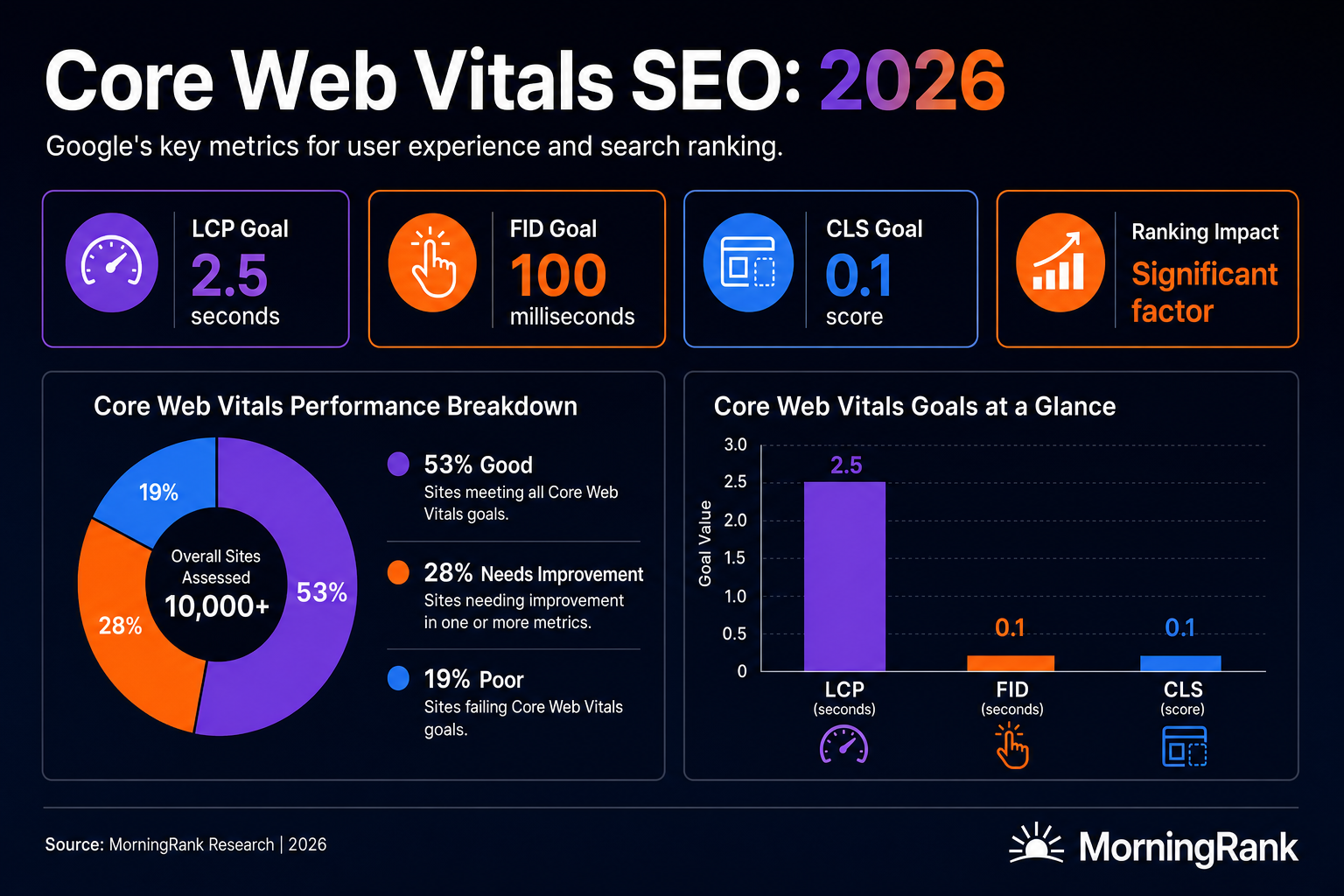
Core Web Vitals are a set of real-world, user-centric metrics that quantify key aspects of the user experience. These include loading performance, interactivity, and visual stability, all of which Google uses to evaluate overall page experience. The trio of metrics currently includes Largest Contentful Paint (LCP), Interaction to Next Paint (INP), and Cumulative Layout Shift (CLS).
Why do Core Web Vitals matter so much for ranking?
Google has explicitly stated that Core Web Vitals are a ranking signal since 2021. For 2026, this signal is more potent than ever, especially with the rise of AI-powered search. Websites that offer a superior page experience are more likely to be favored in search results, particularly when competing against sites with similar content quality. A study by SEO clarity found that a 0.8-second improvement in LCP can result in an 8.35% increase in conversion rates, highlighting the direct business impact of optimizing these metrics (Source: Search Engine Journal). Neglecting Core Web Vitals means risking lower rankings, increased bounce rates, and ultimately, lost business opportunities.
These metrics are measured using real user data (field data) and simulated lab data. Field data comes from the Chrome User Experience Report (CrUX) which aggregates anonymous data from actual Chrome users. Lab data, on the other hand, is collected in a controlled environment using tools like Lighthouse and PageSpeed Insights, providing a diagnostic view without real user variability. Both types of data are crucial for a complete understanding of a site's performance.
How Can You Optimize Largest Contentful Paint (LCP)?
Largest Contentful Paint (LCP) is a Core Web Vital that measures the time it takes for the largest content element on a page to become visible within the viewport. This is typically an image, video, or a large block of text. For a good user experience, LCP should occur within 2.5 seconds of when the page first starts loading.
What causes a poor LCP score?
Common culprits for a high LCP include slow server response times, render-blocking JavaScript and CSS, slow resource load times, and client-side rendering. In my experience, server response time is often the quickest win for agencies looking to boost LCP for their clients. A site that takes too long for the server to respond will always struggle with LCP, regardless of other optimizations.
Strategies for improving LCP:
- Optimize Server Response Time: Upgrade your hosting, use a Content Delivery Network (CDN) to serve content from servers closer to users, and implement server-side caching.
- Eliminate Render-Blocking Resources: Defer non-critical CSS and JavaScript. Use asynchronous loading for scripts that are not essential for the initial page render.
- Optimize Image Loading: Compress images, use modern image formats like WebP, and implement responsive images to serve appropriately sized images. Lazy load off-screen images to prioritize critical content.
- Preload Critical Resources: Use <link rel="preload"> to fetch critical resources, such as fonts or hero images, earlier in the loading process.
- Minimize CSS and JavaScript: Minify your CSS and JavaScript files to reduce their size, thereby reducing the time it takes to download and parse them.
Addressing LCP often involves a combination of these tactics. With MorningRank's SEO audit tool agencies can identify the specific resources that contribute most to LCP on their client sites, enabling a targeted approach to optimization.
| LCP Optimization Area | Impact on Performance | Key Action |
|---|---|---|
| Server Response Time | Directly impacts initial page load | Upgrade hosting, implement CDN, server caching |
| Render-Blocking Resources | Delays content rendering | Defer non-critical JS/CSS, async loading |
| Image Optimization | Reduces largest content element size | Compress, WebP, responsive images, lazy loading |
| Critical Resource Preloading | Prioritizes essential assets | Use <link rel="preload"> for fonts, hero images |
| Code Minification | Reduces file sizes | Minify CSS and JavaScript files |

How Does Interaction to Next Paint (INP) Affect User Experience and Rankings?
Interaction to Next Paint (INP) is the newest Core Web Vital, replacing First Input Delay (FID) in March 2024. INP measures the latency of all user interactions with a page, such as clicks, taps, and keyboard inputs, throughout the page's lifespan. It reports the single longest interaction observed, excluding outliers. A good INP score is generally 200 milliseconds or less.
Why is INP so important for SEO in 2026?
INP directly reflects how responsive a page feels to users. A site with a high INP will feel sluggish and frustrating, even if it loads quickly. Google prioritizes pages that offer a smooth, interactive experience. For agencies, improving INP means ensuring that interactive elements like forms, buttons, and navigation menus respond instantly, contributing to a seamless user journey that Google rewards. Websites with poor interactivity can see higher bounce rates and struggle in competitive SERPs. Data from a Google study indicated a strong correlation between good INP scores and user satisfaction KPIs (Source: web.dev).
Key strategies for improving INP:
- Minimize JavaScript Execution: Long-running JavaScript tasks can block the main thread, delaying user interactions. Break up long tasks, use web workers for heavy computations, and reduce unnecessary JavaScript.
- Optimize Event Handlers: Ensure that event listeners are efficient and do not perform excessive work on the main thread. Debounce input events where appropriate.
- Reduce Input Delay: Identify and remove any scripts or styles that cause delays between a user interaction and the browser's response to that interaction.
- Prioritize Visual Updates: Techniques like `content-visibility` CSS property or `requestAnimationFrame` can help the browser prioritize rendering changes, making the UI feel more responsive.
Analyzing INP often requires drilling deep into client-sided performance. Tools that offer detailed JavaScript execution timing can be invaluable. MorningRank's SEO audit tool can help identify slow-loading scripts and other technical issues that contribute to a poor INP score, providing actionable insights for improvement.
How Can You Fix Cumulative Layout Shift (CLS) Issues?
Cumulative Layout Shift (CLS) is a Core Web Vital that measures the total amount of unexpected layout shift that occurs on a page during its entire lifecycle. This happens when visible elements move around on the page without user interaction, often due to images loading in late or dynamically injected content. A good CLS score is 0.1 or less.
What causes unexpected layout shifts?
Common causes of high CLS include images or video elements without specified dimensions, ads, embeds, and iframes without fixed sizes, dynamically injected content (especially ads or consent banners), and flashes of unstyled content (FOUC). These shifts create a jarring user experience, leading to accidental clicks and user frustration.
Strategies for reducing CLS:
- Set Image and Video Dimensions: Always include `width` and `height` attributes on image and video tags, or reserve space for them using CSS aspect ratio boxes. This allows the browser to allocate the correct amount of space before the resource loads.
- Handle Ads, Embeds, and Iframes: Pre-define the space for ad slots and embeds. Work with ad providers to ensure ad sizes are consistent and do not cause content to shift.
- Avoid Dynamically Injected Content Above Existing Content: If content must be injected dynamically, do so below existing content, or reserve sufficient space for it to prevent shifting.
- Preload Web Fonts: Optimize font loading to prevent flashes of unstyled text (FOUT) or invisible text (FOIT), which can cause layout shifts when fallback fonts are swapped for web fonts. Use `font-display: optional` or `font-display: swap` carefully.
- Animations and Transitions: Use CSS transform properties to animate properties that do not trigger layout changes, such as `transform` and `opacity`, instead of properties like `height` or `width`.
Addressing CLS requires careful attention to how elements load and render. For agencies managing multiple client sites, identifying pervasive CLS issues across a portfolio can be challenging. My personal experience shows that often, the largest CLS contributors are poorly implemented third-party widgets or dynamic ad insertions. The detailed audit reports from MorningRank can pinpoint precise instances of layout shifts, allowing for targeted fixes. You can also monitor your AI visibility tracking to see how improved Core Web Vitals correlate with better trust signals from AI answer engines.
How Can Agencies Audit and Monitor Core Web Vitals Performance in 2026?
Regular auditing and monitoring are indispensable for maintaining optimal Core Web Vitals scores. The performance landscape is dynamic, with user behaviors, website content, and Google's algorithms constantly shifting. Agencies must have robust processes and tools to keep client sites performing at their best.
Essential tools for Core Web Vitals audits:
- Google PageSpeed Insights: Provides both lab and field data for individual URLs, along with actionable recommendations.
- Google Search Console: The Core Web Vitals report in GSC offers a sitewide overview of URLs categorized as "Good, " "Needs improvement, " or "Poor" for LCP, INP, and CLS. This is crucial for identifying widespread issues.
- Lighthouse: Built into Chrome DevTools, it offers a detailed lab-based audit for a single page, complete with performance scores and diagnostics.
- Chrome User Experience Report (CrUX): Provides field data aggregated into a public dataset that can be queried.
- MorningRank SEO Audit Tool: Our platform offers an automated SEO audit feature that specifically flags Core Web Vitals issues, along with other technical SEO problems. It provides a clear health score and prioritized recommendations, making it easy for agencies to manage performance across multiple client projects.
Monitoring should be continuous. Setting up alerts for drops in Core Web Vitals scores in Google Search Console or through a dedicated SEO platform is a proactive strategy. In my career auditing hundreds of sites, I've seen significant ranking drops for sites that suddenly developed Core Web Vitals issues due to new theme updates or third-party script integrations. Proactive monitoring catches these problems before they escalate.
Agencies can leverage MorningRank's automated PDF reports to share Core Web Vitals performance updates with clients, demonstrating the direct impact of technical SEO efforts on user experience and search visibility. These reports can include clear visualizations of improvements over time, highlighting the value provided.
Conclusion: Elevating Site Performance Through Technical SEO Guides in 2026
Mastering Core Web Vitals through diligent technical SEO is not an option in 2026; it is a fundamental requirement for search engine success. From optimizing the Largest Contentful Paint for faster loading to ensuring a smooth Interaction to Next Paint and eliminating disruptive Cumulative Layout Shifts, each metric contributes to a holistic page experience that Google rewards. By systematically addressing these performance indicators, agencies can set their client sites apart in competitive SERP landscapes and generative AI results.
The continuous improvement of Core Web Vitals requires a proactive approach, leveraging advanced SEO tools for consistent auditing and monitoring. Embracing these technical SEO principles builds a foundation for long-term organic growth, strengthens user trust, and ultimately drives better business outcomes for your clients. Prioritizing site performance is a commitment to excellence that pays dividends in rankings, traffic, and conversions.
Frequently Asked Questions
What are the three main Core Web Vitals in 2026?
The three main Core Web Vitals in 2026 are Largest Contentful Paint (LCP), Interaction to Next Paint (INP), and Cumulative Layout Shift (CLS). These metrics measure loading performance, interactivity, and visual stability, respectively, and are crucial for technical SEO.
How frequently should agencies check Core Web Vitals for client sites?
Agencies should check Core Web Vitals for client sites at least monthly, but ideally continuously with automated tools. Regular monitoring helps to quickly identify and address any changes or regressions that could impact search rankings and user experience, ensuring sustained technical SEO performance.
Does improving Core Web Vitals directly affect Google rankings?
Yes, improving Core Web Vitals directly affects Google rankings. Google uses Core Web Vitals as a page experience ranking signal, meaning sites with better performance metrics are more likely to rank higher when other factors are equal. This is critical for effective technical SEO.
What is a good LCP score for web pages in 2026?
A good Largest Contentful Paint (LCP) score for web pages in 2026 is 2.5 seconds or less. This indicates that the main content of the page loads quickly, providing a positive initial user experience, which is a key technical SEO objective.
Why did First Input Delay (FID) get replaced by Interaction to Next Paint (INP)?
First Input Delay (FID) was replaced by Interaction to Next Paint (INP) because INP provides a more comprehensive measure of page interactivity throughout the entire page lifecycle, not just the initial input. INP better reflects the overall user experience and page responsiveness, which is an important aspect of technical SEO.
How can MorningRank help agencies keep track of Core Web Vitals?
MorningRank helps agencies track Core Web Vitals through its comprehensive SEO audit tool and performance reporting features. It identifies specific issues, provides actionable recommendations, and allows agencies to monitor improvements over time, streamlining effective technical SEO for all their client projects.
Ready to put these technical SEO guides into practice and unlock top rankings for your clients? Try MorningRank free today and experience the power of advanced SEO auditing, rank tracking, and client reporting. Visit https://morningrank.com to get started.
Want this kind of insight every week?
MorningRank delivers daily rank tracking, AI SEO recommendations, and white label client reporting.